Adding a Variant Annotation Database
Click the + Add variant annotations button under the Variant annotations section header on the library file management page.
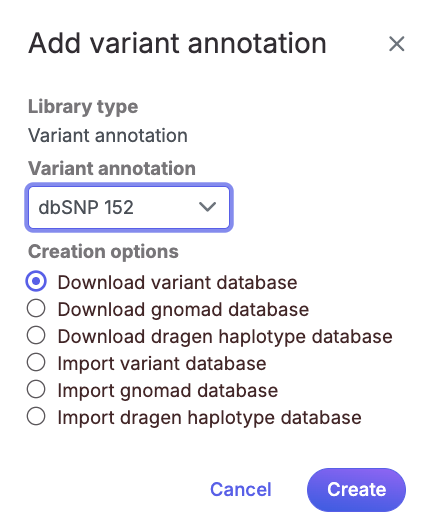
If you are using a human - hg38 assembly, variant annotation databases from various sources will appear in the Variant annotation drop-down list (Figure 1). Available variant annotation database sources include:
dbSNP
ClinVar
gnomad
Illumina DRAGEN haplotype
Multiple versions of the above databases are available. For human - hg38, only dbSNP and ClinVar is currently available. This list is periodically updated.

Choose a database from the drop-down list, select the Download variant database radio button and click Create.
If you prefer to add a custom variant annotation database, perhaps from another source or 'gold-standard' validated variants, choose Add variant database from the Variant annotation drop-down list (Figure 2). Name the variant annotation database by typing into the Custom Name box and click Create. Characters such as $ * | \ : " < > ? / % cannot be used in custom names. A variant annotation database can be added from from your local computer by clicking the option of My Computer. Only the files with relevant file extensions will be visible (.vcf and various compressed formats).

Last updated
Was this helpful?
